


Recognition of Prior Learning, Professional Teacher & Guidance Counsellor Education
Do you have prior knowledge that meet the learning objectives of professional teacher or guidance counsellor education? If so, you can apply for recognition of prior learning, RPL.
RPL (recognition of prior learning) refers to the recognition of previously completed studies or the acknowledgment of skills acquired through work experience as part of your studies. Therefore, you do not need to study the same material again that you already know. The most important thing is that the skills can be identified and recognised. This way, you have the opportunity to progress in your studies faster than the group’s program.
In the School of Professional Teacher Education you can apply for recognition of previously acquired skills either through credit transfer (replacement) or skills demonstration.
Replacement means that a previously completed higher education course can replace a specific course included in HAMK’s Professional Teacher or Guidance Counsellor Education.
Through the Skills Demonstration process, you can demonstrate the skills acquired through work experience. Competence cannot be assessed solely based on a work certificate; the evaluation occurs through the process of demonstrating and showcasing skills.
On the RPL application, you can also see inclusion as one option. Inclusion is not used in the studies of professional teacher and guidance counsellor education.
- The credit transfer can be applied by a student who is currently attending a programme at HAMK. If you are about to begin your studies, please wait until the studies have officially commenced.
- Be an active student when you want to have your prior studies recognized. Familiarize yourself with the curriculum and compare your skills and prior studies to the learning objectives of your studies.
- Please contact the programme’s guidance counsellor if necessary. In the competence demonstrations, you can contact the teacher responsible for the course.
- Fill in the details carefully! If the application is incomplete or filled in incorrectly, it will be returned to you for correction. If you do not complete your application within one (1) month, the handler may reject the application.
- Please fill in the details carefully as the information will be transferred as is to the your transcript of records.
- Credit transfer is always requested with the original certificate or importing studies through Emrex service.
- The RPL application must be submitted at least two weeks before the start of the course. An exception is made for the first course of the programme, optional studies, and practical teacher training, where the deadline is flexible.
- The processing time for the RPL application is a maximum of two weeks from the submission of the application (excluding the summer period). If the application needs to be returned to the student for correction or completion of information, the processing time will be considered to commence from the point at which the application has all the necessary information for processing.
- An approved RPL application is binding. The recognition cannot be revoked.
- If your RPL application is rejected, you must complete the studies normally according to your study group’s schedule. If necessary, you can also file an appeal of the decision.
For help and guidance, please contact the guidance counsellor of your study programme:
International Professional Teacher Education

Professional Guidance Counsellor Education

Credit transfer
If your previous studies’ contents and objectives correspond to contents and objectives of teacher education or guidance counsellor programmes, you may apply for credit transfers for some of your studies. Check the specific principles of your study programme below, as it may not be possible to obtain credit transfers for all study modules.
- Credit transfer can be granted only if your previous studies match the course for which you are applying for replacement. The learning objectives, assessment criteria, and scope of the studies must align with the course being credited.
- Previous studies must be credit-rated higher education studies. Also courses for educational personnel funded by the Finnish National Agency for Education can be accepted.
- The prior studies must have been completed within the last five (5) years, calculated from the start year of your studies.
- Credit transfer is only granted for entire courses.
Basic Studies in Educational Sciences (12 cr)
- If you have submitted the transcript of completed basic studies in educational sciences when applying to the programme, you don’t need to apply for credit transfer. The credit transfer is approved automatically for you.
- There is no time limit for the basic studies in educational sciences.
- The basic studies in special education do not entitle credit transfer for the basic studies in educational sciences in teacher education. These studies may be eligible for other credit transfers.
- If the Basic Studies in Educational Sciences have been completed in another School of Professional Teacher Education than HAMK, where the scope has been less than 12 credits, you must do a supplementary assignment to meet the scope of 12 credits.
Optional study (5 cr)
- Credit transfer can also be granted for Optional Studies (5 credits) on the basis on pedagogical studies that deepen and expand the teacher’s competence. The scope of the prior studies must be at least 5 credits.
- The prior studies must have been completed within the last five (5) years, calculated from the start year of your teacher education studies. If the scope of prior studies were at least 15 credits, there is no time limit.
- Examples of studies eligible for credit transfer: Basic studies in special education, intermediate studies in pedagogy, studies in university pedagogy, specialisation studies for teachers, training as a competence-based qualification master and training as a driving instructor.
- Credits for the optional study may be granted based on basic studies in education science if the studies were completed no more than five years ago and the scope of the studies was at least 15 credits. In this case, fill in the RPL application for the optional study.
Other studies
- In the courses Planning of Teaching and Personalisation and Support of Learning, there is an opportunity for supplementary assignments based on certain previous studies.
- No credit transfer can be granted for the Teacher’s Expertise in Education and Learning course.
- If you have the decision on recognition from the Finnish National Agency, and you only need to complete 15-30 credits, the rest of the credits are automatically accredited for you based on the National Agency’s decision.
- Studies completed elsewhere can be credited towards studies based on official documents, i.e. certificates.
- The prerequisite for recognition of prior learning is that previous studies correspond in objectives and content to the current curriculum of the professional guidance counsellor education.
- No credit transfer can be granted for the courses Guidance and Career Theory Competence, Guidance Methodology Skills and Educational Institution Competence in Guidance Counselling.
Log into Pakki service (pakki.hamk.fi) and select RPL.
Scan or photograph the certificates into files that you can then attach to your application when completing it.
Proceed using the + buttons. If you need to make any changes to your application, click the pen icon.
- Start the application by selecting New RPL Application at the top of the page.
- Fill in the details of the guidance discussion. Give the date of the first contact day of studies.
- Choose the correct guidance counsellor from the drop-down menu to handle your application.
- International Professional Teacher Education: Eveliina Grönberg
- Professional Guidance Counsellor Education: Anna Alftan
- Save the draft and start filling out the application.
- Go to + Places and Attachments.
- From the Type of organisation, choose Educational institute and fill out other fields marked as compulsory.
- Add the certificate from prior studies, for example, the transcript of records, as a PDF document.
- Add a description if needed.
- Save.
- Go to + Add previously completed study
- Choose Replacement as the credit transfer type.
- Select Eveliina Grönberg (Professional Teacher Education) or Anna Alftan (Professional Guidance Counsellor Education) as the handler.
- Select +Add study and enter the information about your previously completed university-level course or module.
- Leave the code section empty.
- Enter the course name.
- Fill out other fields marked as compulsory and then Save.
- Move to the middle section of the page (Choose from the studies in PSP (Personal Study Plan)).
- Select the course for which you are applying the replacement. Drag the course to the ‘Selected courses for application’ field on the right or by clicking on the cross arrow icon next to the course.
- If you are applying credit transfer from Optional studies, select the course named External Elective Course.
- Save.
- Before sending the application, check the application information for mistakes. Finally click Submit application.
Note! If you want your previously completed studies to be accredited for multiple courses, and you are not sure whether all of them will be approved, you can submit multiple application (Add study) for each course, targeting the application to a different study each time. This will allow the handler to make decisions based on your suggestions for each course individually.
You can import information about the studies you have completed elsewhere to the RPL application through Emrex. When importing information through Emrex, you do not need to add information about the place of performance to the application separately. Emrex enables sharing study information directly from one university to another in Finland and internationally.
If the Emrex service has brought all the required information to the mandatory fields, you do not need to attach a transcript of records to the application.
Importing studies
- Start the RPL application by selecting + New application from the top right corner.
- Always start an RPL application by saving the information from the guidance discussion and the place of performance. Check that your information is correct and add the date of the guidance discussion and the name of the handler. The system automatically offers the person designated as your counselor. If you want to choose another person, just start typing their name in the field and choose their name from the drop down list.
In the Additional Information field, you can enter information from the guidance discussion if you wish, but you can also leave it blank. Do not add any sensitive information to the fields of the RPL application. - Select Save draft and start filling out application.
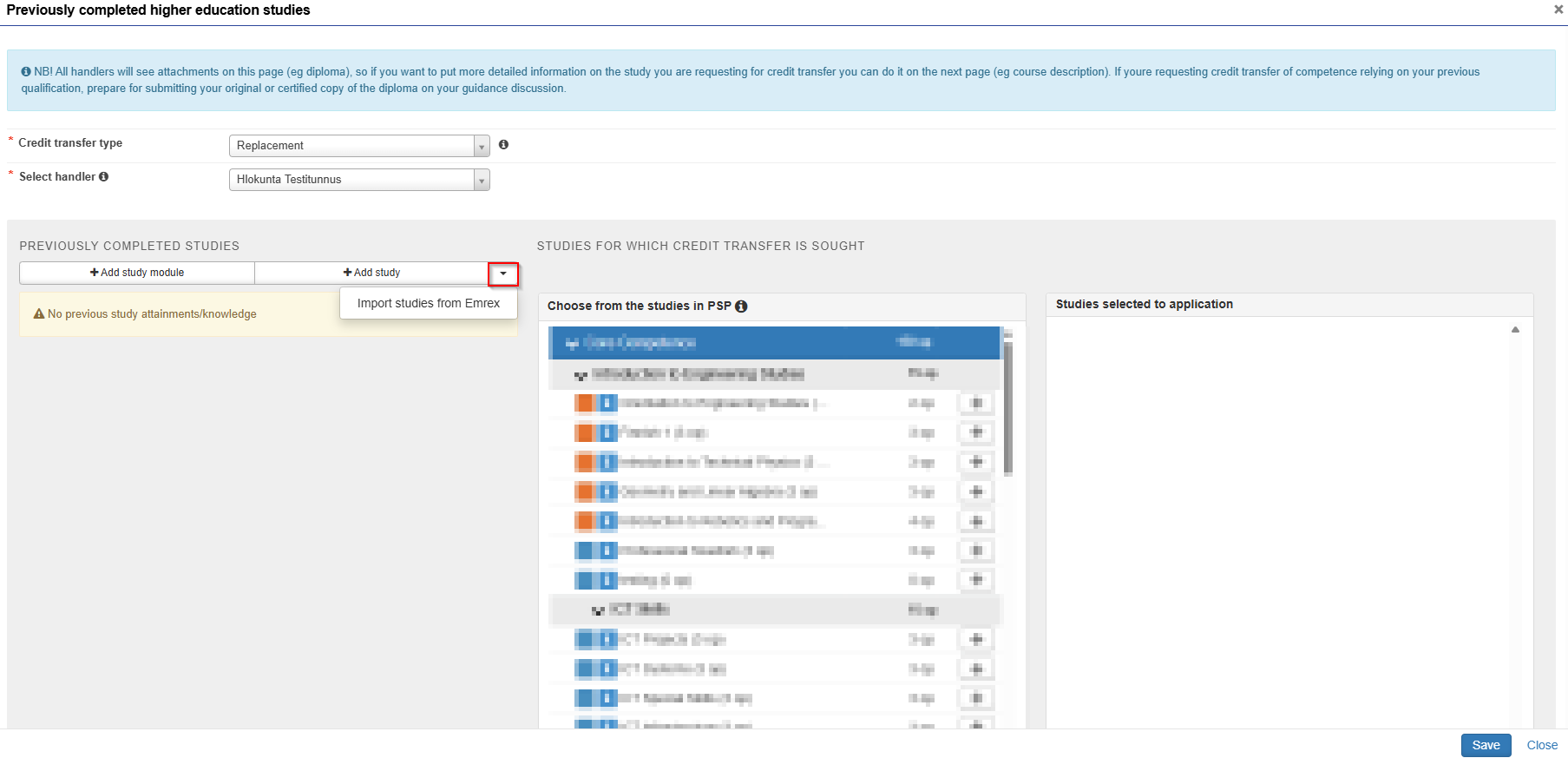
- Go to the section Studies or competences on the application and select + Previously Completed Higher Education Studies.
- Choose Credit transfer type and Select handler
- Click the arrow on the right side of Add study button and select Import studies from Emrex.
- Emrex opens on a new window. Please carefully read all instructions on the new window.
- Choose country and institution. If you are applying for study credits from a foreign university, the service requires that you still have valid user credentials for that university.
- Choose the studies you wish to add to your application.
- Send the studies by clicking Send.
- Check and send the study information.
- After sending, you will be directed back to the application. The information about the imported studies through Emrex will be visible on the application. You cannot edit the information, but you can add additional information to the justification field.
- Check and finish the application and Submit application.
Importing studies electronically through EMREX
This video shows you how to import studies completed elsewhere from Emrex to your RPL application.
If the importing is not successful, please update or try a different browser and try again. If the place of performance is written in Finnish in both of the name fields, the handler of the application will correct the information while checking your application. Please remember to upload a Transcript of Records or Degree Certificate to the application.
Skills demonstration
Through the skills demonstration procedure, you can demonstrate competence obtained through work experience. Competence cannot be assessed solely on the basis of a work certificate. The evaluation takes place through the process of demonstrating and showcasing skills.
Competence is assessed in relation to the assessment criteria for the course. The process proceeds as follows:
- You must first familiarise yourself with the instructions for skills demonstrations and the assessment criteria for the courses.
- Carry out a personal competence survey at the beginning of your studies.
- Have a development discussion with your tutor teacher. If the outcome of this process is that you have the competence outlined in the assessment criteria, you can proceed to the application.
- Fill in the RPL application and agree with the teacher how to carry out the actual skills demonstration.
- Carry out the skills demonstration as agreed.
Skills demonstration cannot be used to obtain RPL for the following courses:
- Professional Teacher Education: Teacher’s expertise in education and learning
- Professional Guidance Counsellor Education: Educational institution competence in guidance counselling.
The application for skills demonstration is submitted to the teacher responsible for the study module, who is usually the group’s tutor teacher.
The following document shows the assessment criteria for each course in the International Professional Teacher Education, the requirements for demonstrating competence, and the methods for skills demonstrating:
The assessment criteria of Professional Guidance Counsellor Education can be found from the study guide:
Log into Pakki service (pakki.hamk.fi) and select RPL.
Scan or photograph the certificates into files that you can then attach to your application when completing it. Name and number the files clearly, so it is easier for you to refer to the relevant file when justifying your competence.
Proceed using + buttons. If you need to make any changes to your application, click on the pen icon.
- Start the application by selecting New application.
- Give the date of the guidance discussion.
- Give the name of the teacher with whom the guidance discussion was held.
- Save the draft and start filling out the application.
- Move to Add a place of performance
- Select Work experience as the Type, and then as the Type of organisation, choose Work places.
- Fill out the other fields marked as compulsory.
- Add your job certificates as attachments.
- Save.
- Go to Studies or competences and select in the Previously acquired competence.
- Choose Replacement as the credit transfer type.
- Select the handler. This should be the teacher responsible of the course.
- From Previously acquired knowledge choose + Add knowledge.
- Leave Grade field empty.
- Select the right Place from the list.
- Justifications: Describe your competence from the work experience by comparing it to the evaluation criteria of the course. You should also refer to the relevant numbered file you have uploaded. If you want to show your competence with a skills demonstration, here you can propose a way to do that.
- Add.
- Move to the middle section (Choose from the studies in PSP).
- Select the course for which you are applying the replacement by either clicking the cross arrow or dragging the selected course to the right under the Studies selected to application section.
- Save.
- Before sending the application, check the application information for mistakes. Finally click Submit application.
Note! If you want your skills demonstration to be accredited for multiple courses, and you are not sure whether all of them will be approved, you can submit multiple applications (Add knowledge) for each course, targeting the application to a different study each time. This will allow the handler to make decisions based on your suggestions for each course individually.
Filing an appael
If a student is dissatisfied with the decision on the credit transfer or assessment of their skills demonstration, they can file an appeal for rectification. The appeal should be submitted to the person who made the decision or the teacher who assessed the skills demonstration. A written or oral appeal must be submitted within 14 days of receiving notification of the decision. The student is considered to have received notification of the decision one day after it has been recorded in Pakki.
Appeals will be processed without delay. A student who is dissatisfied with the response they receive can apply for a correction from HAMK’s Examinations Board. A written appeal must be submitted within 14 days of the student receiving the response.
An appeal can be submitted to the Examination Board by email to tutkintolautakunta(at)hamk.fi or to the address: HAMK’s Examination Board, Registry, PO Box 230, Visamäentie 35 A, 13101 Hämeenlinna. The appeal will be considered timely if it is recorded as received within 14 days of the student receiving notification of the response.
The written appeal must include the student’s demands with justification, the name of the course or study module and code, a copy of the decision, the student’s name, degree, and necessary contact information.
The Examination Board will handle the appeal without delay. The members of the Examination Board cannot participate in the handling of appeals for the studies they have evaluated. The Examination Board bases its decision on regulations, HAMK’s guidelines, the curriculum, and the relevant assessment material. The examination board will provide the parties with a protocol containing the decision on the appeal. The decision of the Examination Board cannot be appealed.